Claude Code in Action
- Introduction
- Prepare
- Install
- How to use
- Get started
- Common workflows
- Update Claude Code
- Uninstall Claude Code
- News
- Interactive mode
- Slash commands
- CLI reference
- Claude Code MCP
- Subagents
- Agent Skills
- 最佳实践
- Q&A
- 使用参考
- Changelog
- Refer
Introduction
Claude Code is an agentic coding tool that lives in your terminal, understands your codebase, and helps you code faster by executing routine tasks, explaining complex code, and handling git workflows – all through natural language commands. Use it in your terminal, IDE, or tag @claude on Github.
Learn more in the official documentation.
Claude is a highly performant, trustworthy, and intelligent AI platform built by Anthropic. Claude excels at tasks involving language, reasoning, analysis, coding, and more.
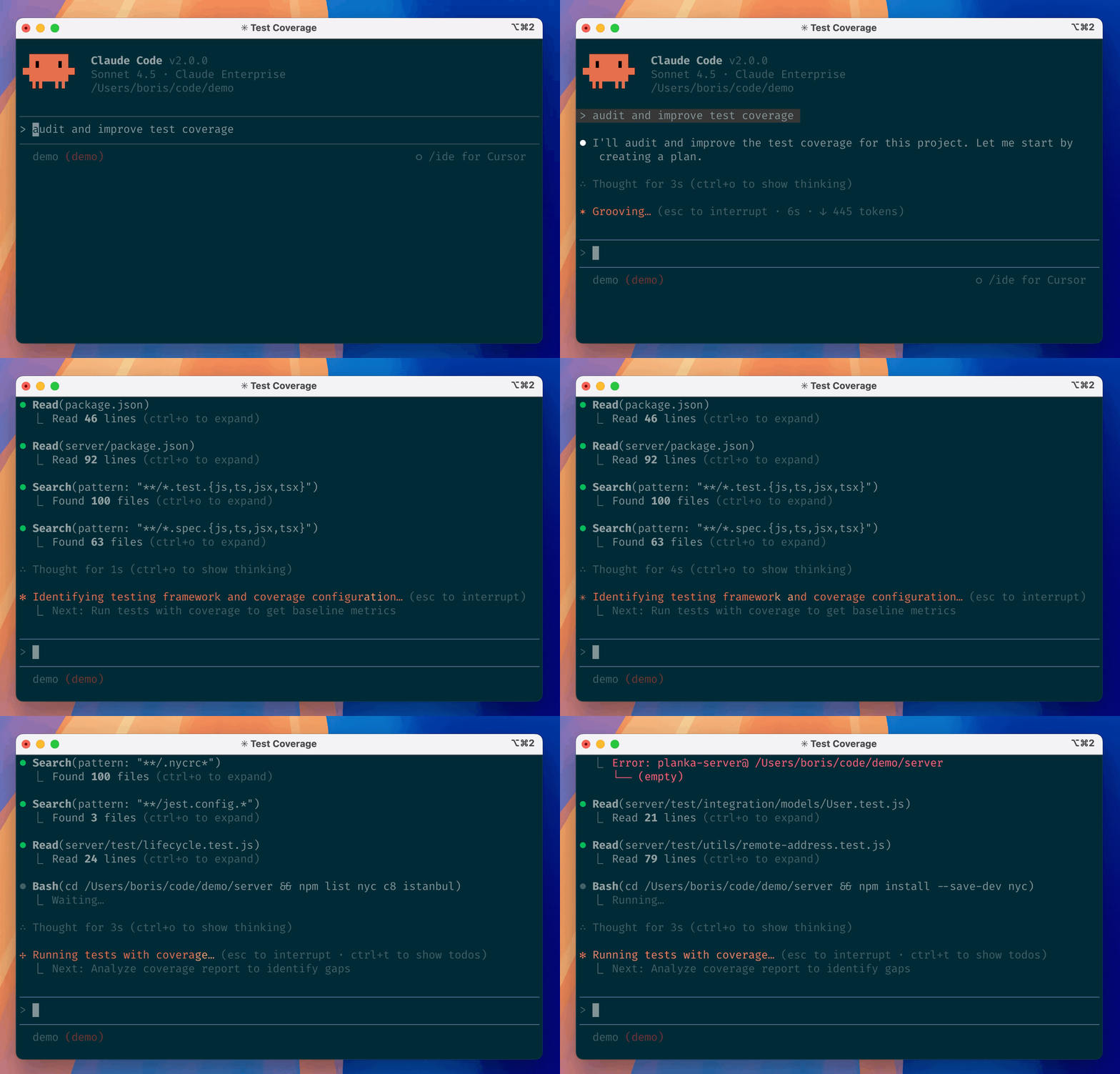
The latest generation of Claude models:
- Claude Opus 4.5 - Most intelligent model, and an industry-leader for coding, agents, and computer use. Learn more.
- Claude Sonnet 4.5 - Balanced performance and practicality for most uses, including coding and agents. Learn more.
- Claude Haiku 4.5 - Fastest model with near-frontier intelligence. Learn more.
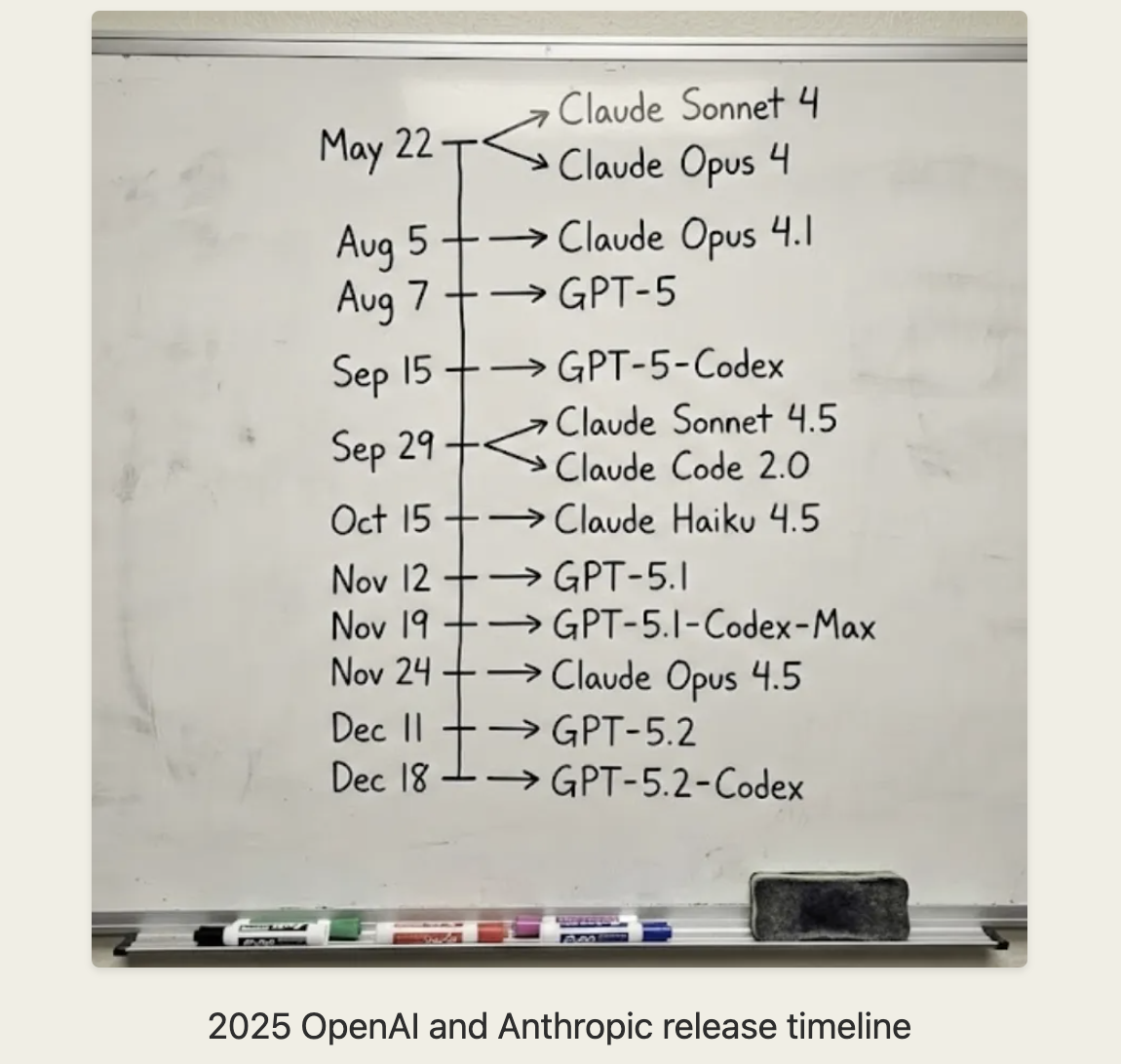
What Claude Code does for you
-
Build features from descriptions: Tell Claude what you want to build in plain English. It will make a plan, write the code, and ensure it works.
-
Debug and fix issues: Describe a bug or paste an error message. Claude Code will analyze your codebase, identify the problem, and implement a fix.
-
Navigate any codebase: Ask anything about your team’s codebase, and get a thoughtful answer back. Claude Code maintains awareness of your entire project structure, can find up-to-date information from the web, and with MCP can pull from external datasources like
Google Drive,Figma, andSlack. -
Automate tedious tasks: Fix fiddly lint issues, resolve merge conflicts, and write release notes. Do all this in a single command from your developer machines, or automatically in CI.
Why developers love Claude Code
-
Works in your terminal:
Not another chat window. Not another IDE. Claude Code meets you where you already work, with the tools you already love. -
Takes action: Claude Code can directly edit files, run commands, and create commits. Need more? MCP lets Claude read your design docs in Google Drive, update your tickets in Jira, or use your custom developer tooling.
-
Unix philosophy: Claude Code is composable and scriptable.
tail -f app.log | claude -p "Slack me if you see any anomalies appear in this log stream" works.
Your CI can run claude -p "If there are new text strings, translate them into French and raise a PR for @lang-fr-team to review".
- Enterprise-ready: Use Anthropic’s API, or host on
AWSorGCP. Enterprise-grade security, privacy, and compliance is built-in.
Prepare
System requirements
- Operating Systems: macOS 10.15+, Ubuntu 20.04+/Debian 10+, or Windows 10+ (with WSL 1, WSL 2, or Git for Windows)
- Hardware: 4GB+ RAM
- Software: Node.js 18+
- Network: Internet connection required for authentication and AI processing
- Shell: Works best in
Bash,ZshorFish - Location: Anthropic supported countries
Install
Native Install (Recommended)
macOS, Linux, WSL:
curl -fsSL https://claude.ai/install.sh | bash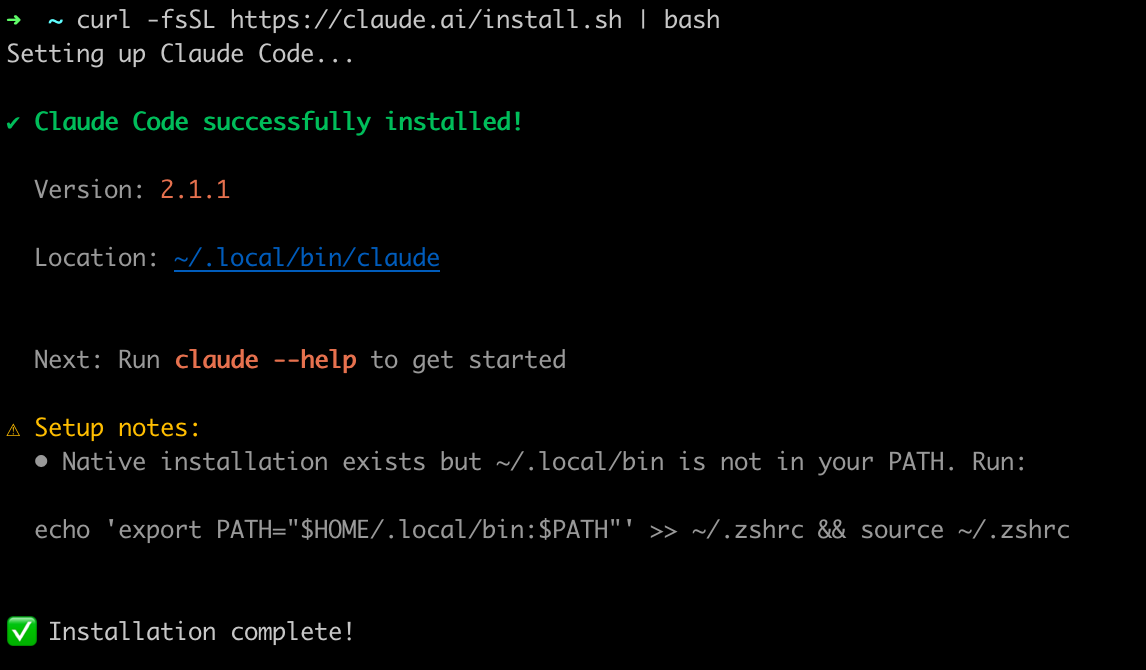
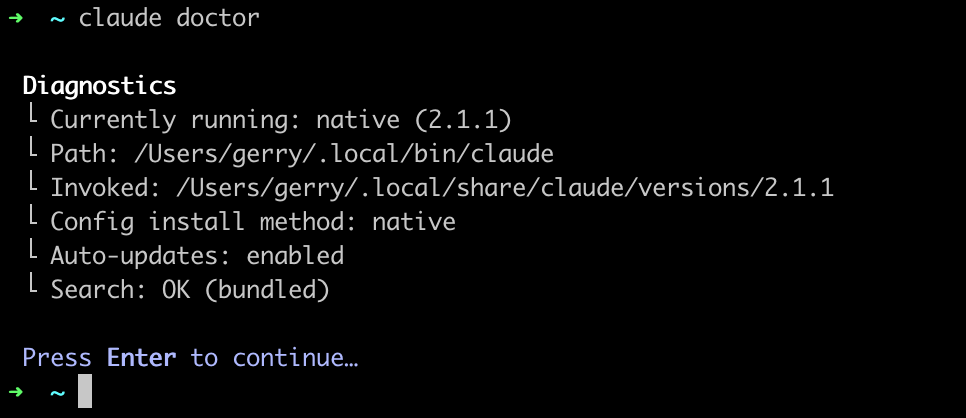
echo 'export PATH="$HOME/.local/bin:$PATH"' >> ~/.zshrc && source ~/.zshrc➜ ~ claude --help
Usage: claude [options] [command] [prompt]
Claude Code - starts an interactive session by default, use -p/--print for non-interactive output
Arguments:
prompt Your prompt
Options:
--add-dir <directories...> Additional directories to allow tool access to
--agent <agent> Agent for the current session. Overrides the 'agent'
setting.
...NPM 方式
Install nvm
refer: Installing nodejs and npm on linux
I really recommend you install node and npm using nvm (Node Version Manager). This is the fastest, cleanest and easiest way to do it.
To install or update nvm, you should run the install script. To do that, you may either download and run the script manually, or use the following cURL or Wget command:
curl -o- https://raw.githubusercontent.com/nvm-sh/nvm/v0.40.3/install.sh | bash

wget -qO- https://raw.githubusercontent.com/nvm-sh/nvm/v0.40.3/install.sh | bash
Running either of the above commands downloads a script and runs it. The script clones the nvm repository to ~/.nvm, and attempts to add the source lines from the snippet below to the correct profile file (~/.bashrc, ~/.bash_profile, ~/.zshrc, or ~/.profile). If you find the install script is updating the wrong profile file, set the $PROFILE env var to the profile file’s path, and then rerun the installation script.
export NVM_DIR="$([ -z "${XDG_CONFIG_HOME-}" ] && printf %s "${HOME}/.nvm" || printf %s "${XDG_CONFIG_HOME}/nvm")"
[ -s "$NVM_DIR/nvm.sh" ] && \. "$NVM_DIR/nvm.sh" # This loads nvm
最后执行 . .bashrc 使得 nvm 环境设置生效。
$ nvm -h

Node Version Manager (v0.40.3)

Note: <version> refers to any version-like string nvm understands. This includes:
  - full or partial version numbers, starting with an optional "v" (0.10, v0.1.2, v1)
  - default (built-in) aliases: node, stable, unstable, iojs, system
  - custom aliases you define with `nvm alias foo`

 Any options that produce colorized output should respect the `--no-colors` option.

Usage:
  nvm --help                                  Show this message

...
And you are now able to install node typing:
nvm install <version>For example
nvm install 4.2.1If you just want to install the latest node version, you can just type
nvm install node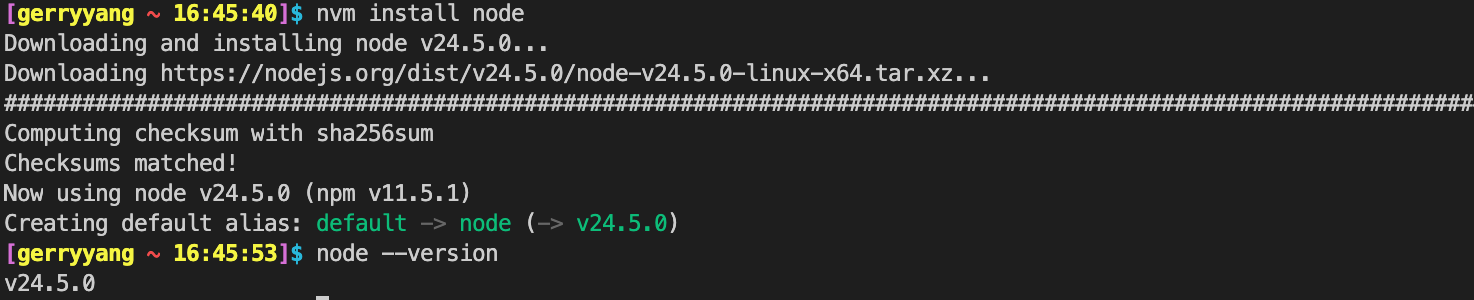
Install Claude Code
参考:https://code.claude.com/docs/en/setup
# Install Claude Code
npm install -g @anthropic-ai/claude-code

# Navigate to your project
cd your-awesome-project

# Start coding with Claude
claudeNote: Do NOT use
sudo npm install -gas this can lead to permission issues and security risks. If you encounter permission errors, see configure Claude Code for recommended solutions.Some users may be automatically migrated to an improved installation method. Run
claude doctorafter installation to check your installation type.
Got specific setup needs or hit issues? See advanced setup or troubleshooting.
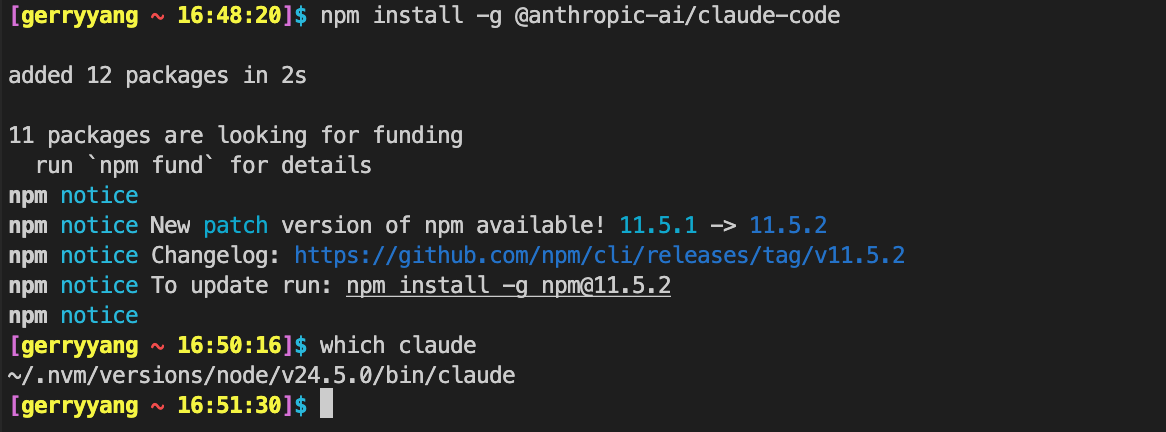
$ ls -l ~/.nvm/versions/node/v24.5.0/bin/claude
lrwxrwxrwx 1 gerryyang users 52 Aug  6 16:50 /data/home/gerryyang/.nvm/versions/node/v24.5.0/bin/claude -> ../lib/node_modules/@anthropic-ai/claude-code/cli.js
How to use
After the installation process completes, navigate to your project and start Claude Code:
cd your-awesome-project
claude
Claude Code offers the following authentication options:
-
Anthropic Console: The default option. Connect through the Anthropic Console and complete the OAuth process. Requires active billing at console.anthropic.com.
-
Claude App (with Pro or Max plan): Subscribe to Claude’s Pro or Max plan for a unified subscription that includes both Claude Code and the web interface. Get more value at the same price point while managing your account in one place. Log in with your Claude.ai account. During launch, choose the option that matches your subscription type.
-
Enterprise platforms: Configure Claude Code to use Amazon Bedrock or Google Vertex AI for enterprise deployments with your existing cloud infrastructure.
Claude Code securely stores your credentials. See Credential Management for details.
Get started
Prerequisites
- An Anthropic Console account
- An API key
Call the API
- Set your API key
Get your API key at the Claude Console and set it as an environment variable:
export ANTHROPIC_API_KEY='your-api-key-here'- Make your first API call
Run this command to create a simple web search assistant:
curl https://api.anthropic.com/v1/messages \
  -H "Content-Type: application/json" \
  -H "x-api-key: $ANTHROPIC_API_KEY" \
  -H "anthropic-version: 2023-06-01" \
  -d '{
    "model": "claude-sonnet-4-5",
    "max_tokens": 1000,
    "messages": [
      {
        "role": "user",
        "content": "What should I search for to find the latest developments in renewable energy?"
      }
    ]
  }'
Example output:
{
  "id": "msg_01HCDu5LRGeP2o7s2xGmxyx8",
  "type": "message",
  "role": "assistant",
  "content": [
    {
      "type": "text",
      "text": "Here are some effective search strategies to find the latest renewable energy developments:\n\n## Search Terms to Use:\n- \"renewable energy news 2024\"\n- \"clean energy breakthrough\"\n- \"solar/wind/battery technology advances\"\n- \"green energy innovations\"\n- \"climate tech developments\"\n- \"energy storage solutions\"\n\n## Best Sources to Check:\n\n**News & Industry Sites:**\n- Renewable Energy World\n- GreenTech Media (now Wood Mackenzie)\n- Energy Storage News\n- CleanTechnica\n- PV Magazine (for solar)\n- WindPower Engineering & Development..."
    }
  ],
  "model": "claude-sonnet-4-5",
  "stop_reason": "end_turn",
  "usage": {
    "input_tokens": 21,
    "output_tokens": 305
  }
}
Common workflows
参考:https://code.claude.com/docs/en/common-workflows
Learn about common workflows with Claude Code.
Update Claude Code
Auto updates
Claude Code automatically keeps itself up to date to ensure you have the latest features and security fixes.
- Update checks: Performed on startup and periodically while running
- Update process: Downloads and installs automatically in the background
- Notifications: You’ll see a notification when updates are installed
- Applying updates: Updates take effect the next time you start Claude Code
Disable auto-updates
# Via configuration
claude config set autoUpdates false --global

# Or via environment variable
export DISABLE_AUTOUPDATER=1
Update manually
claude updateUninstall Claude Code
If you need to uninstall Claude Code, follow the instructions for your installation method.
Native installation
Remove the Claude Code binary and version files:
macOS, Linux, WSL:
rm -f ~/.local/bin/claude
rm -rf ~/.local/share/claude
NPM installation
npm uninstall -g @anthropic-ai/claude-codeClean up configuration files (optional)
Removing configuration files will delete all your settings, allowed tools, MCP server configurations, and session history.
To remove Claude Code settings and cached data:
# Remove user settings and state
rm -rf ~/.claude
rm ~/.claude.json

# Remove project-specific settings (run from your project directory)
rm -rf .claude
rm -f .mcp.json
News
Introducing Claude Opus 4.5 (2025年11月25日)
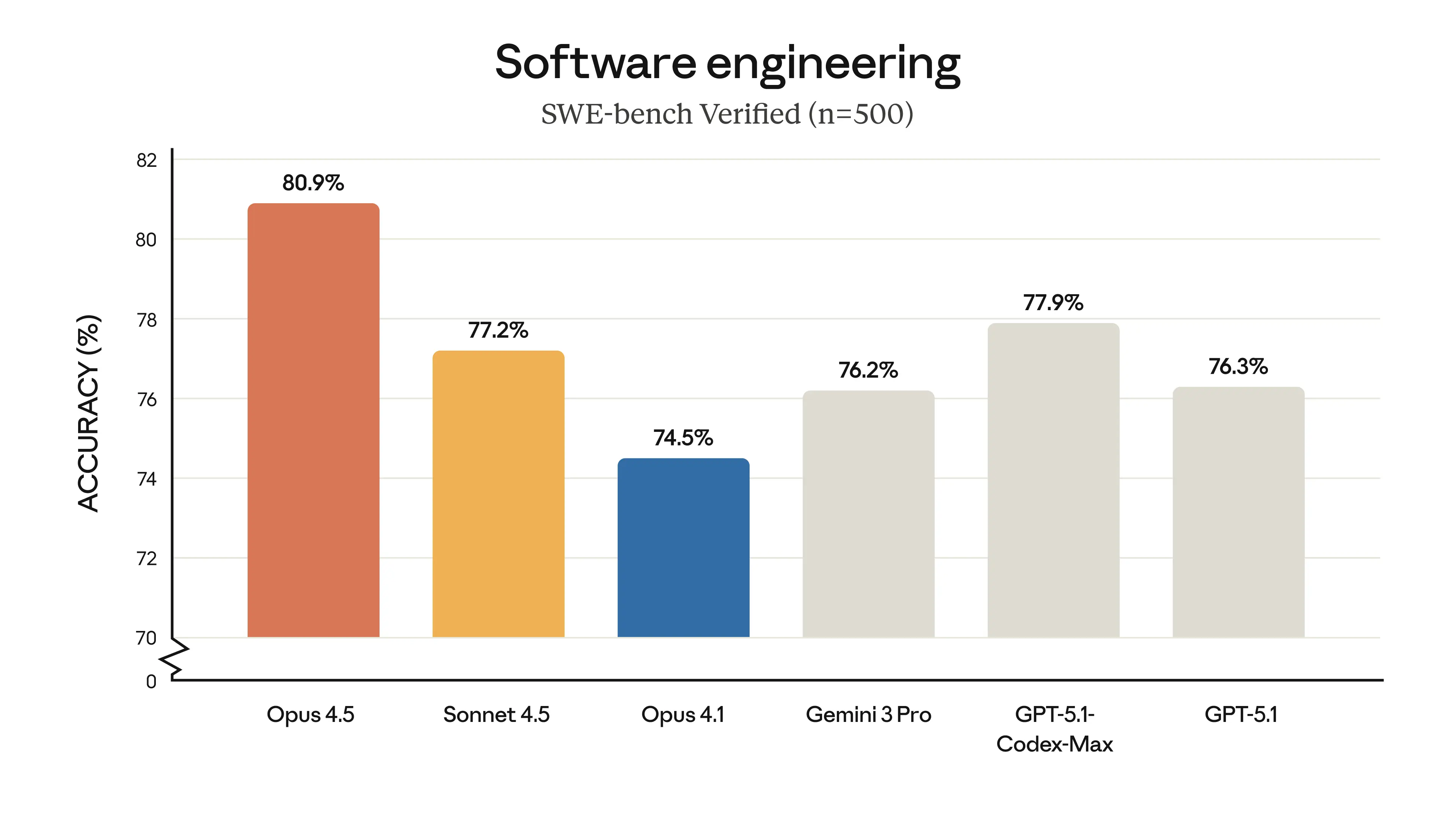
Our newest model, Claude Opus /ˈəʊpəs/ 4.5, is available today. It’s intelligent, efficient, and the best model in the world for coding, agents, and computer use. It’s also meaningfully better at everyday tasks like deep research and working with slides and spreadsheets. Opus 4.5 is a step forward in what AI systems can do, and a preview of larger changes to how work gets done.
Claude Opus 4.5 is state-of-the-art on tests of real-world software engineering:
Introducing Claude Opus 4.6 (2026年2月5日)
We’re upgrading our smartest model.
The new Claude Opus 4.6 improves on its predecessor’s coding skills. It plans more carefully, sustains agentic tasks for longer, can operate more reliably in larger codebases, and has better code review and debugging skills to catch its own mistakes. And, in a first for our Opus-class models, Opus 4.6 features a 1M token context window in beta1.
Opus 4.6 can also apply its improved abilities to a range of everyday work tasks: running financial analyses, doing research, and using and creating documents, spreadsheets, and presentations. Within Cowork, where Claude can multitask autonomously, Opus 4.6 can put all these skills to work on your behalf.
Interactive mode
参考:https://code.claude.com/docs/en/interactive-mode
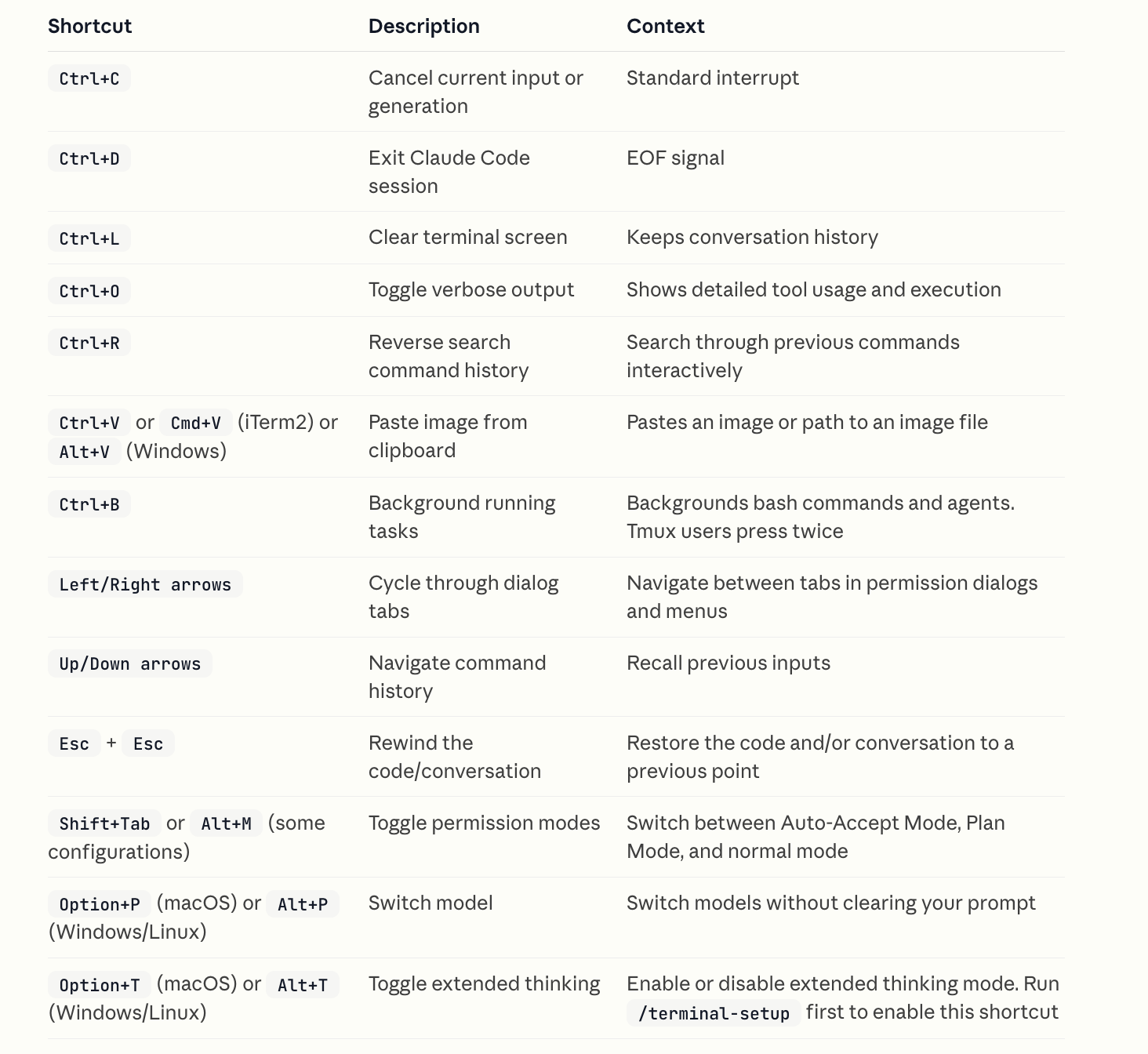
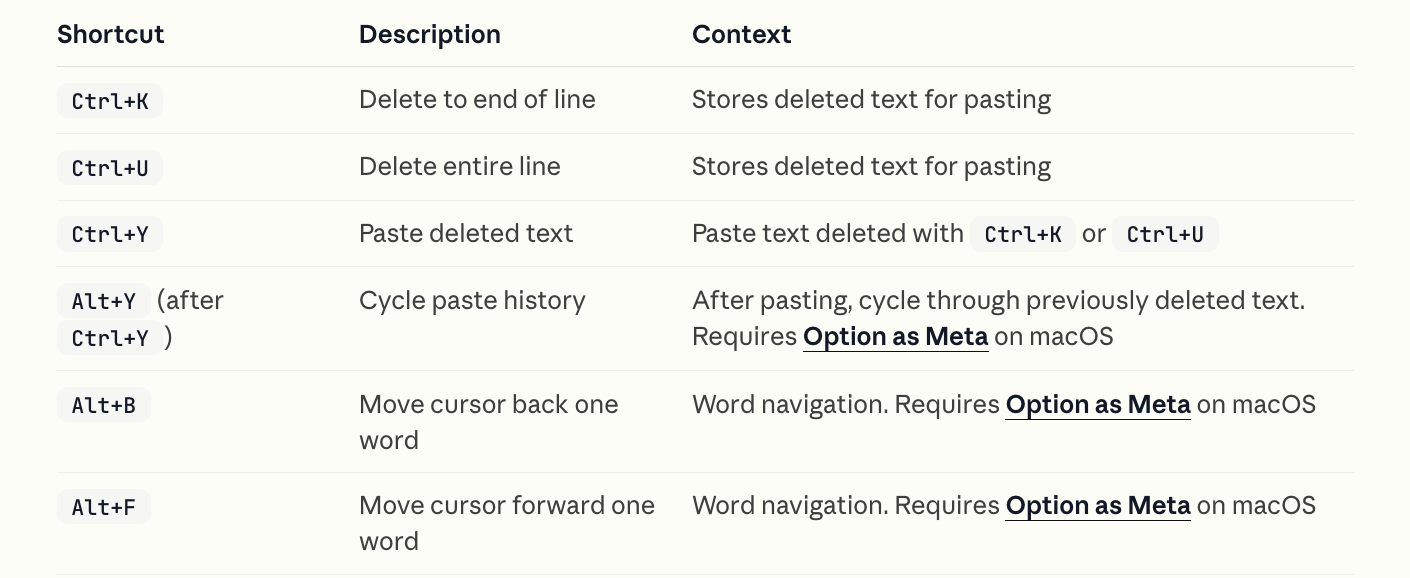
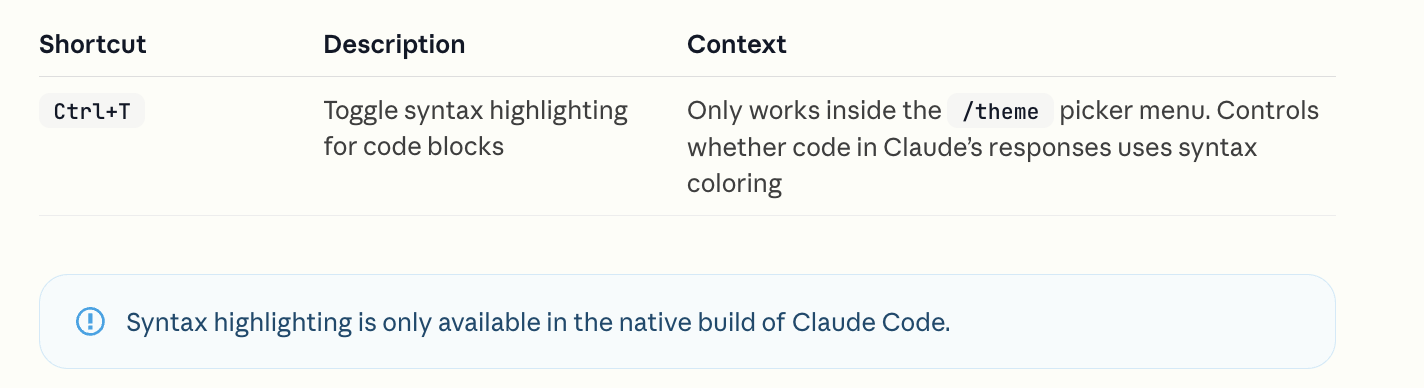
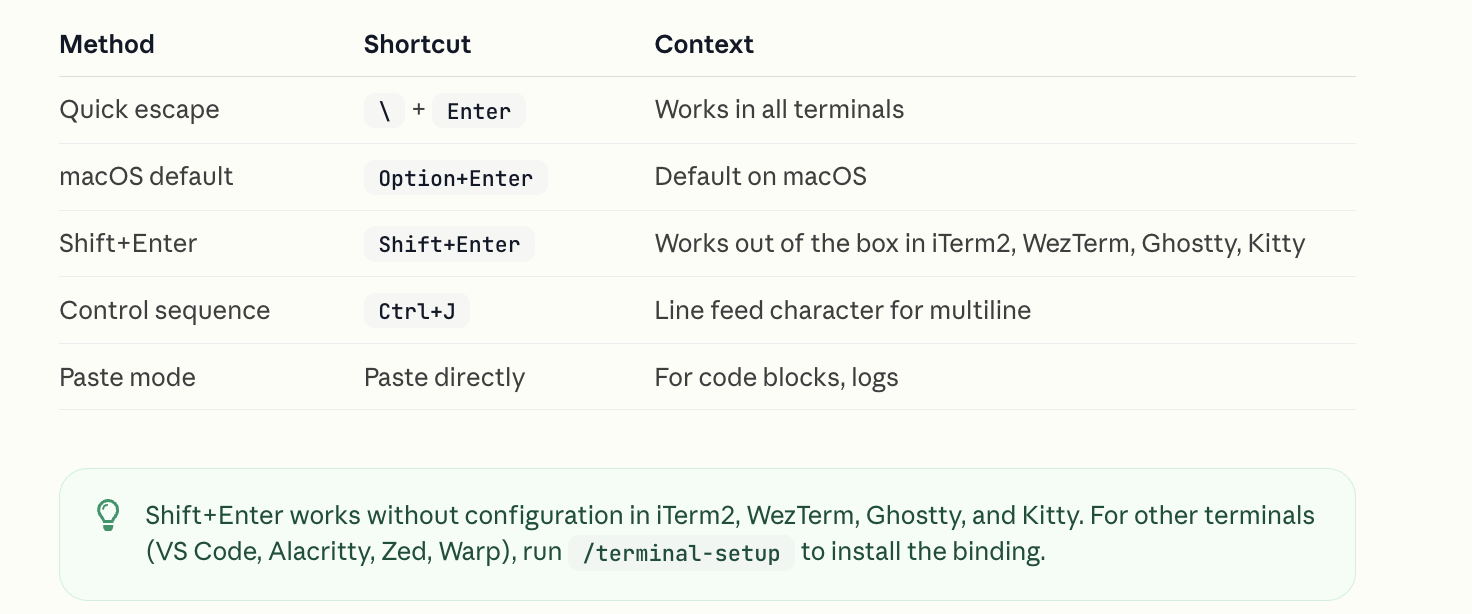
Complete reference for keyboard shortcuts, input modes, and interactive features in Claude Code sessions.
Keyboard shortcuts
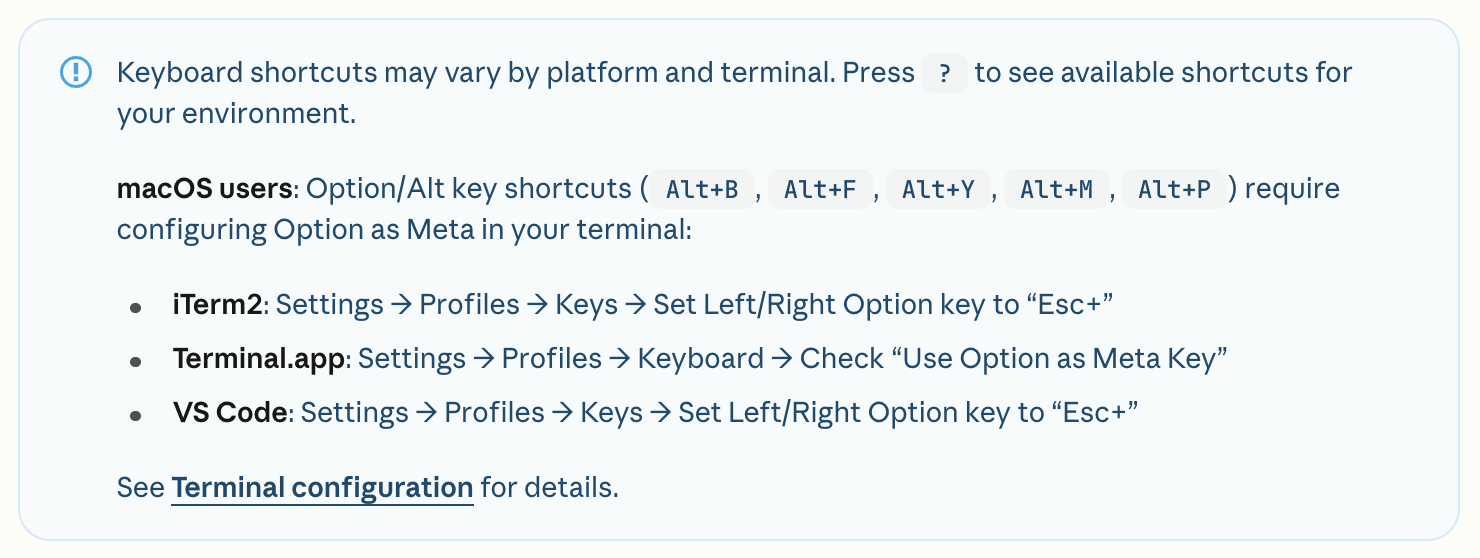
General controls
Text editing
Theme and display
Multiline input
Quick commands
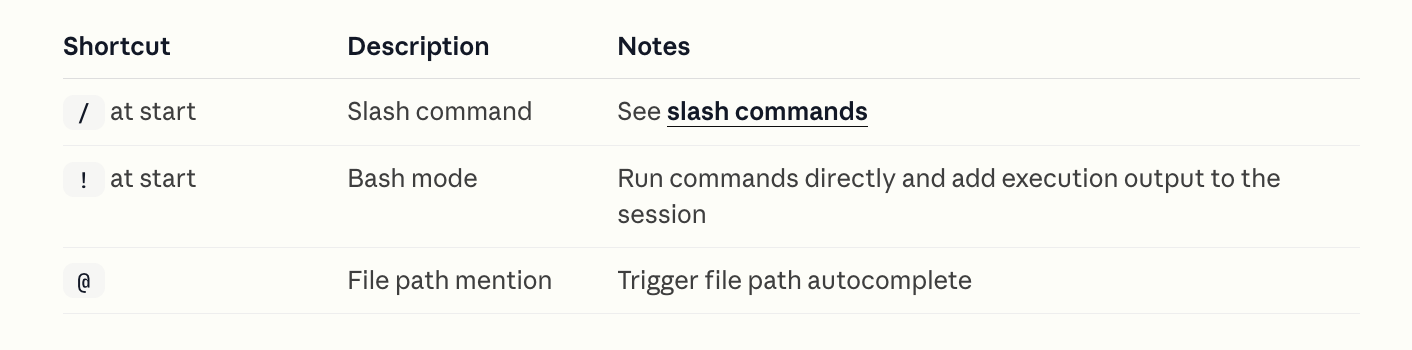
Slash commands: https://code.claude.com/docs/en/slash-commands
Vim editor mode
Enable vim-style editing with /vim command or configure permanently via /config.
Command history
Claude Code maintains command history for the current session:
- History is stored per working directory
- Cleared with
/clearcommand - Use Up/Down arrows to navigate (see keyboard shortcuts above)
- Note: History expansion (
!) is disabled by default
Reverse search with Ctrl+R
Press Ctrl+R to interactively search through your command history:
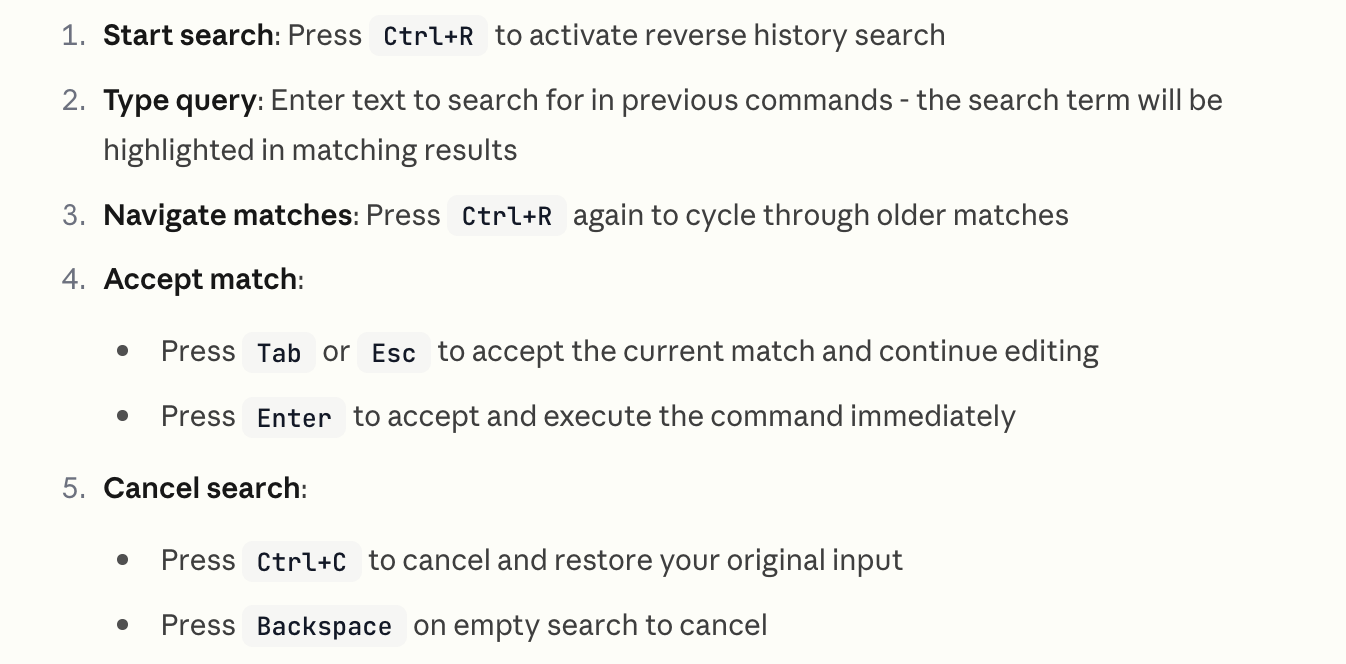
The search displays matching commands with the search term highlighted, making it easy to find and reuse previous inputs.
Background bash commands
Claude Code supports running bash commands in the background, allowing you to continue working while long-running processes execute.
Slash commands
参考:https://code.claude.com/docs/en/slash-commands
Control Claude’s behavior during an interactive session with slash commands.
## Built-in slash commands
https://code.claude.com/docs/en/slash-commands#built-in-slash-commands
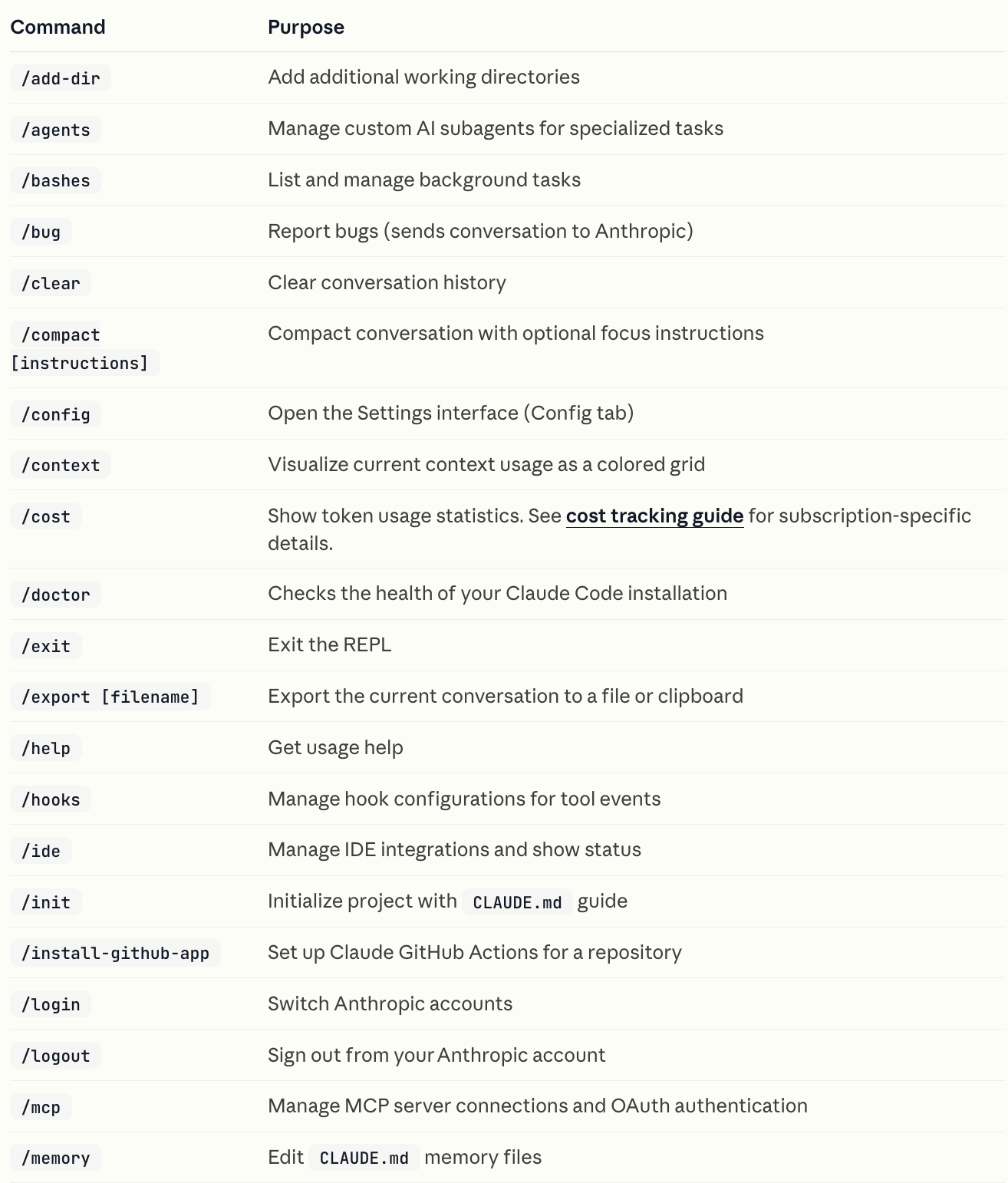
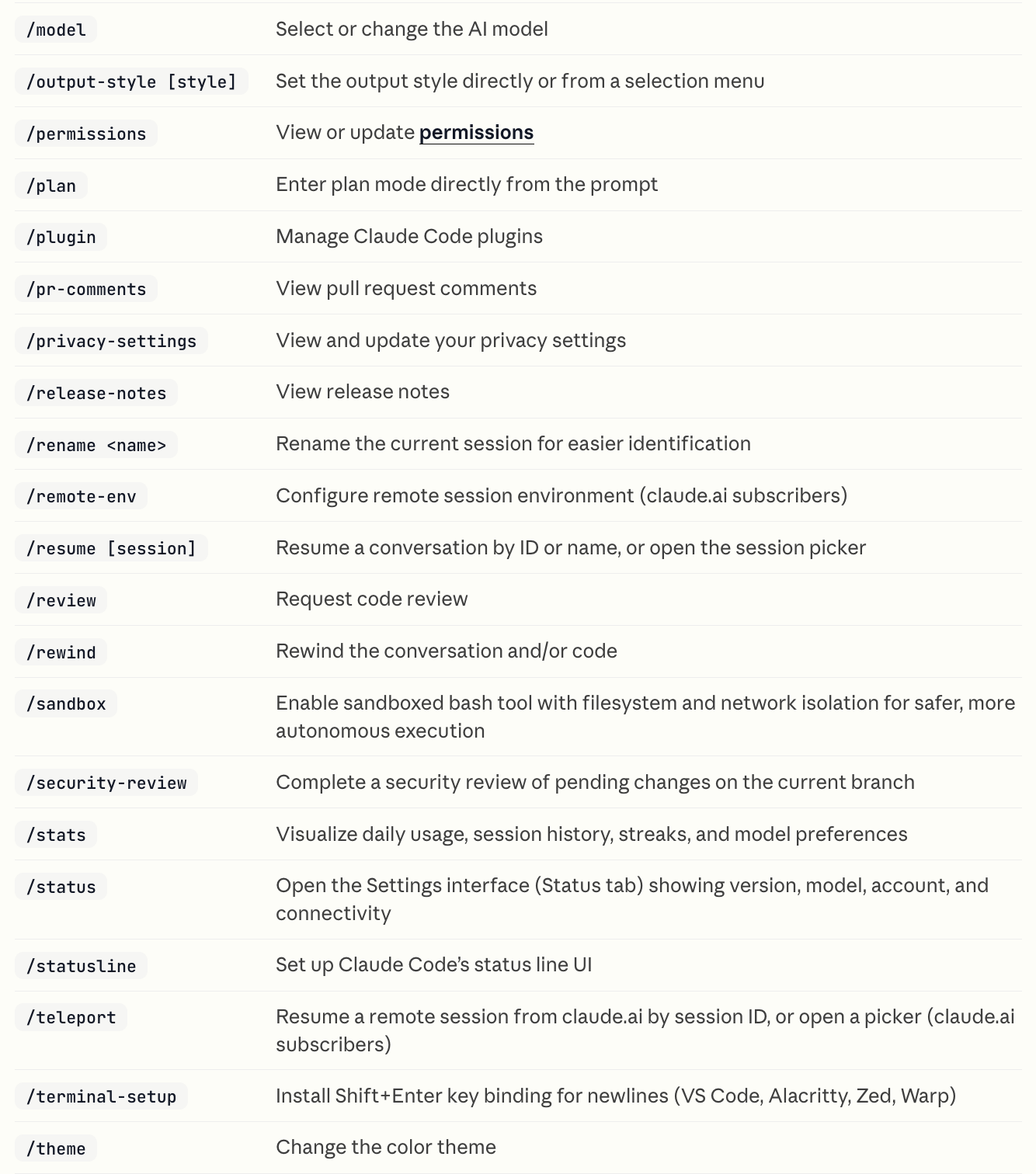

Custom slash commands
Custom slash commands allow you to define frequently used prompts as Markdown files that Claude Code can execute. Commands are organized by scope (project-specific or personal) and support namespacing through directory structures.

More: https://code.claude.com/docs/en/slash-commands#custom-slash-commands
Plugin commands
Plugins can provide custom slash commands that integrate seamlessly with Claude Code. Plugin commands work exactly like user-defined commands but are distributed through plugin marketplaces.
More: https://code.claude.com/docs/en/slash-commands#plugin-commands
MCP slash commands
MCP servers can expose prompts as slash commands that become available in Claude Code. These commands are dynamically discovered from connected MCP servers.
More: https://code.claude.com/docs/en/slash-commands#mcp-slash-commands
SlashCommand tool
The SlashCommand tool allows Claude to execute custom slash commands programmatically during a conversation. This gives Claude the ability to invoke custom commands on your behalf when appropriate.
To encourage Claude to use the SlashCommand tool, reference the command by name, including the slash, in your prompts or CLAUDE.md file. For example:
> Run /write-unit-test when you are about to start writing tests.More: https://code.claude.com/docs/en/slash-commands#slashcommand-tool
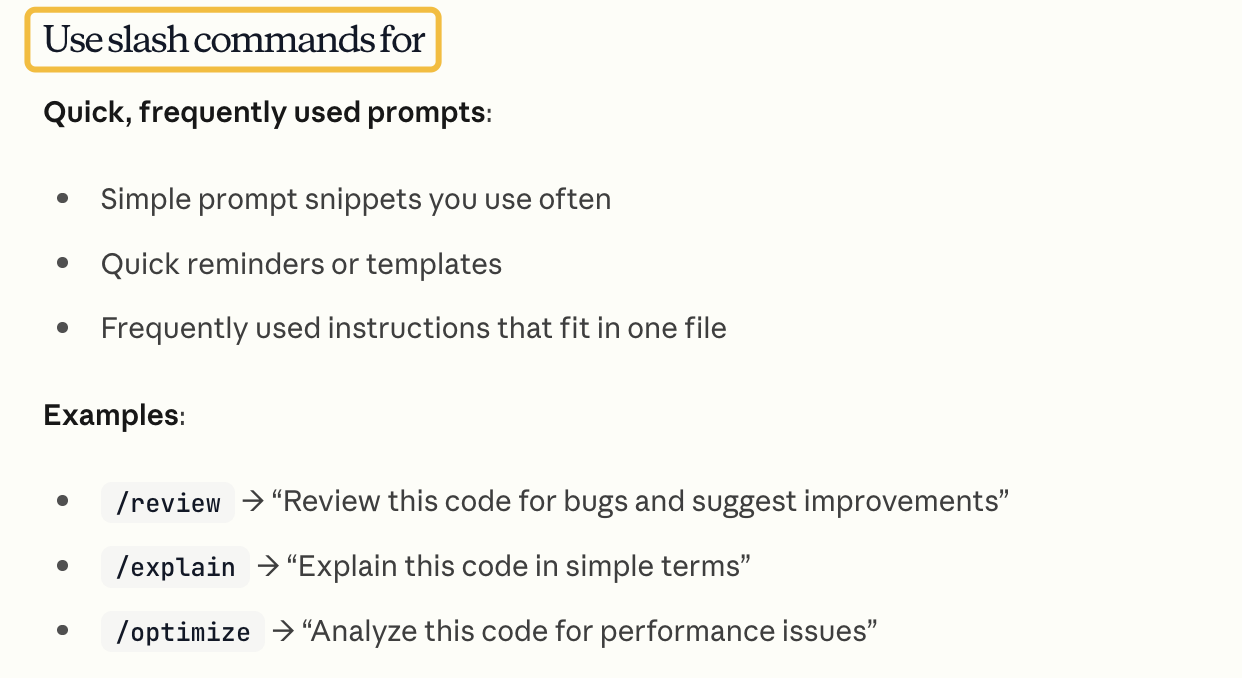
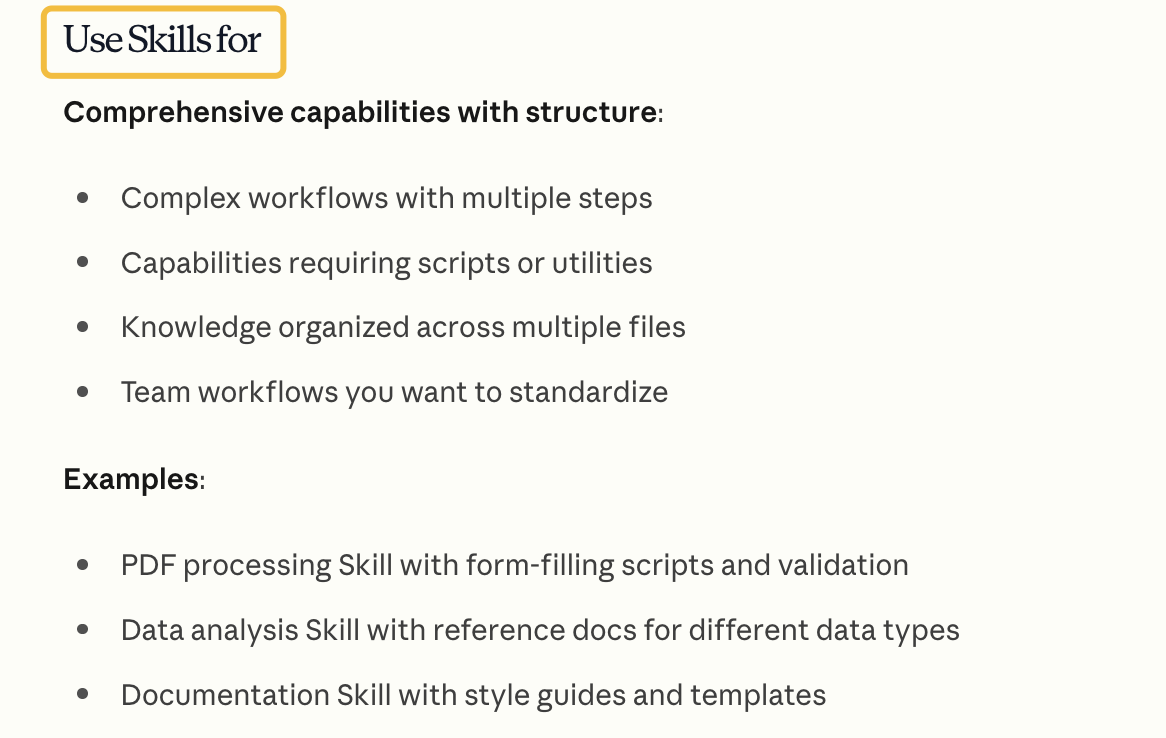
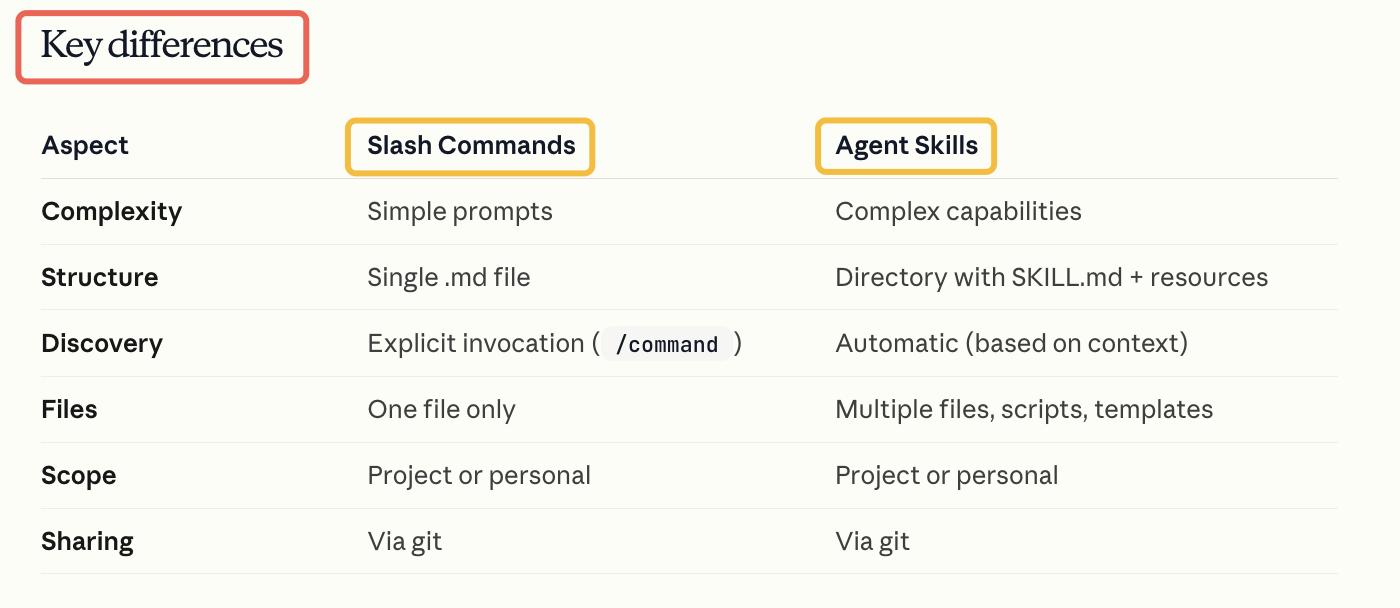
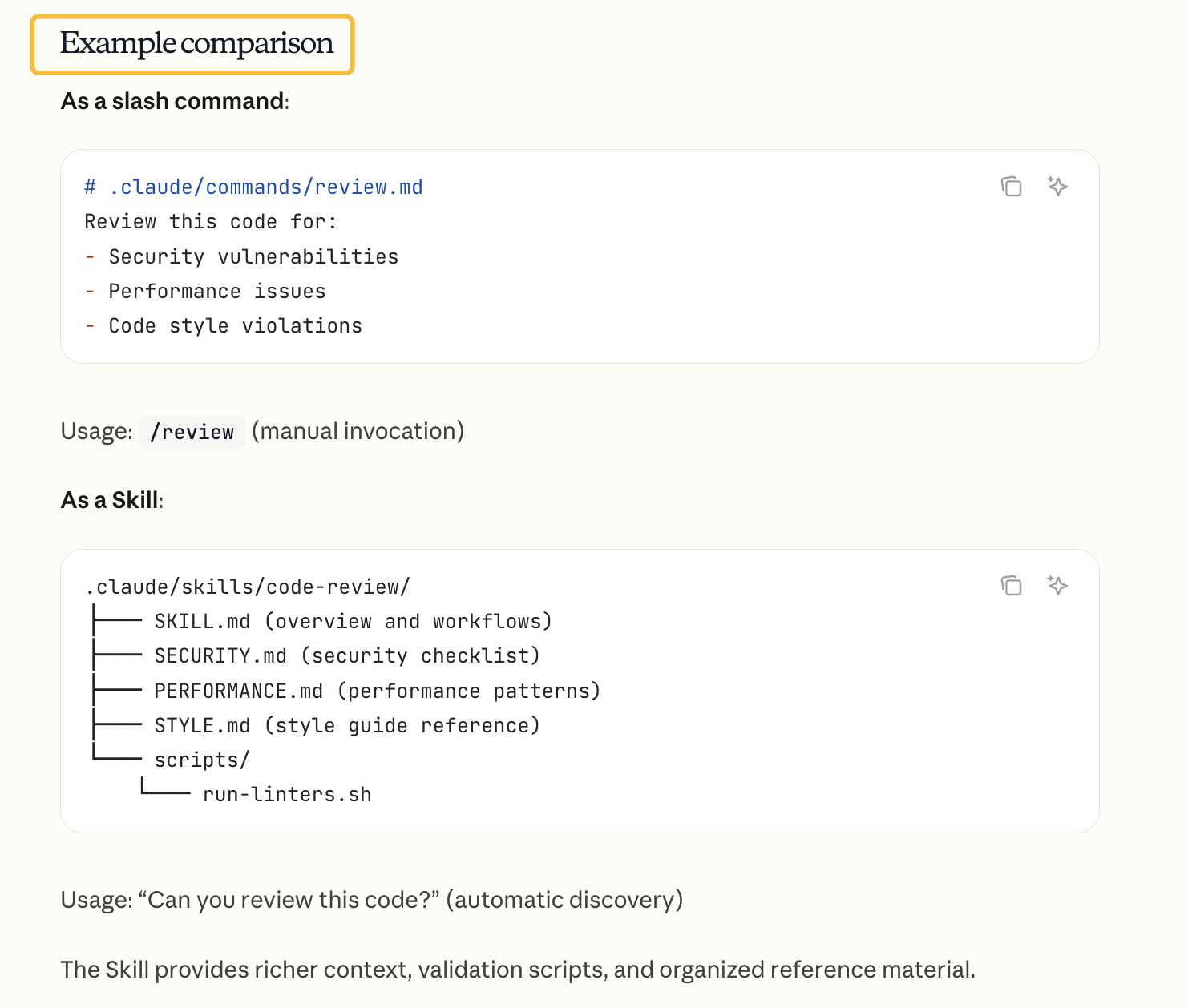
Skills vs slash commands
Slash commands and Agent Skills serve different purposes in Claude Code:
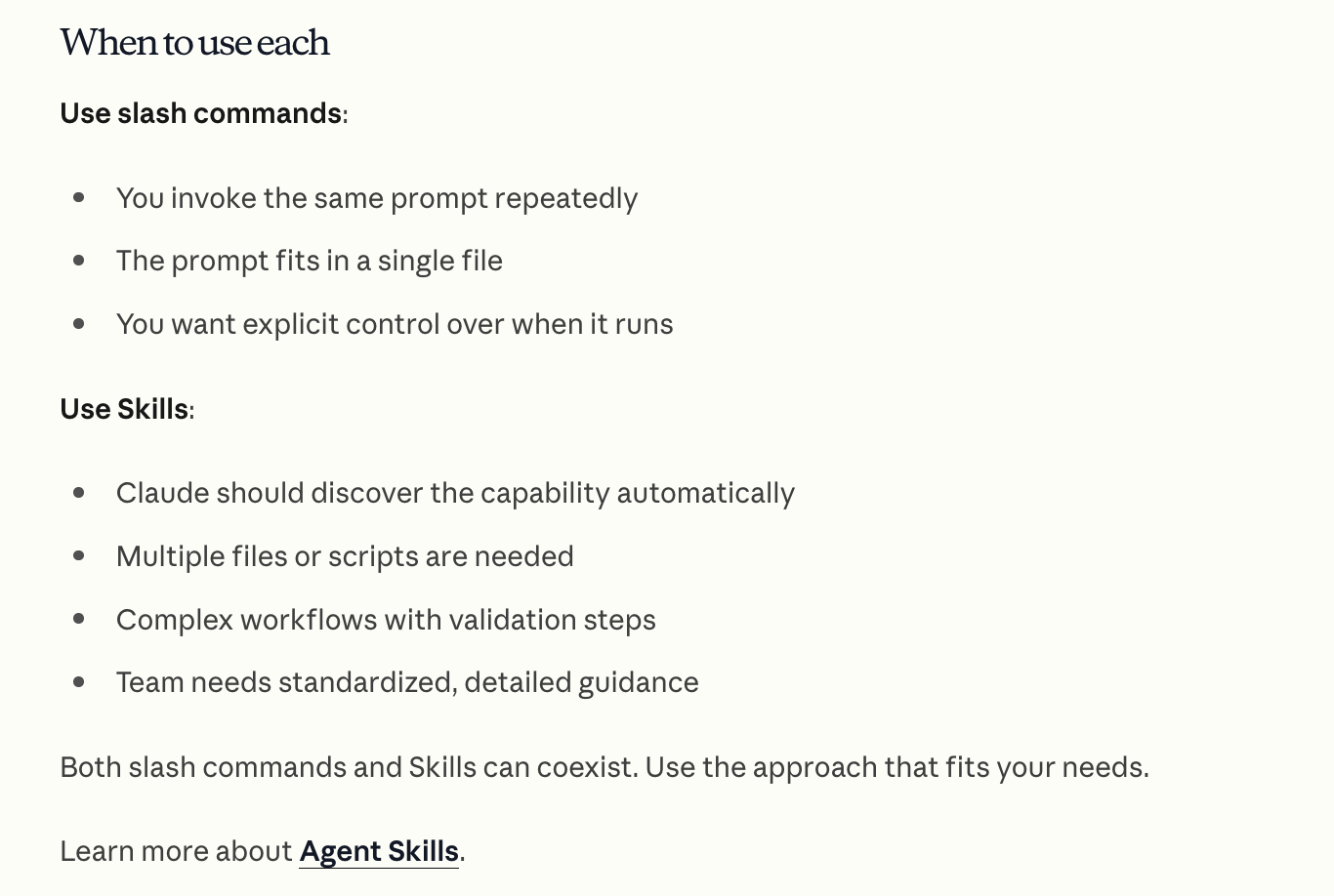
https://code.claude.com/docs/en/skills
CLI reference
参考:https://code.claude.com/docs/en/cli-reference
Complete reference for Claude Code command-line interface, including commands and flags.
CLI commands
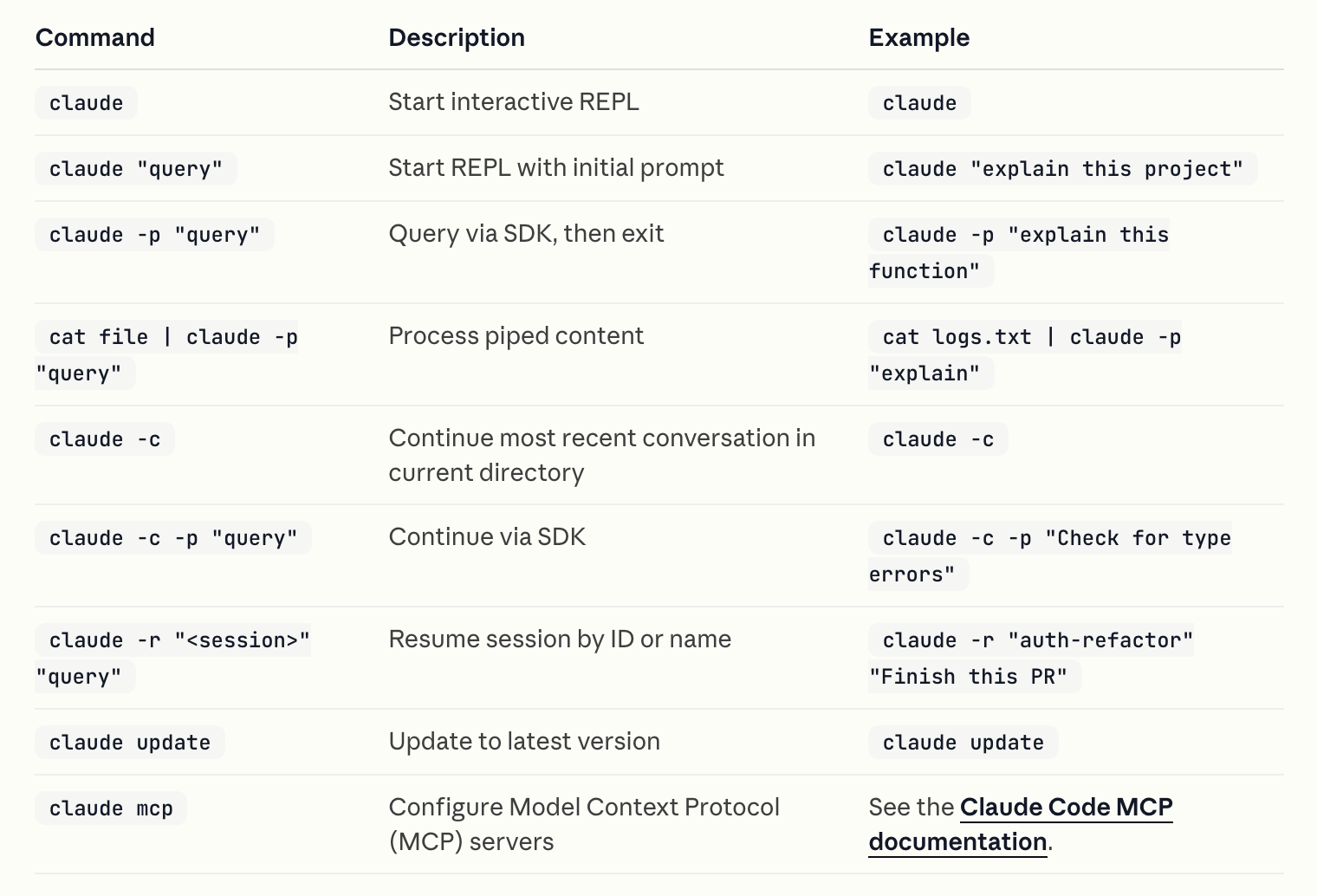
CLI flags
Customize Claude Code’s behavior with these command-line flags:
--add-dir- Description: Add additional working directories for Claude to access (validates each path exists as a directory)
- Example:
claude --add-dir ../apps ../lib
--continue, -c- Description: Load the most recent conversation in the current directory
- Example:
claude --continue
--model- Description: Sets the model for the current session with an alias for the latest model (
sonnetoropus) or a model’s full name - Example:
claude --model claude-sonnet-4-5-20250929
- Description: Sets the model for the current session with an alias for the latest model (
--output-format- Description: Specify output format for print mode (options: text, json, stream-json)
- Example:
claude -p "query" --output-format json

--print, -p- Description: Print response without interactive mode (see SDK documentation for programmatic usage details)
- Example:
claude -p "query"
--resume, -r- Description: Resume a specific session by ID or name, or show an interactive picker to choose a session
- Example:
claude --resume auth-refactor
--session-id- Description: Use a specific session ID for the conversation (must be a valid
UUID) - Example:
claude --session-id "550e8400-e29b-41d4-a716-446655440000"
- Description: Use a specific session ID for the conversation (must be a valid
--system-prompt- Description: Replace the entire system prompt with custom text (works in both interactive and print modes)
- Example:
claude --system-prompt "You are a Python expert"
--tools- Description: Restrict which built-in tools Claude can use (works in both interactive and print modes). Use “” to disable all, “default” for all, or tool names like “Bash,Edit,Read”
- Example:
claude --tools "Bash,Edit,Read"
--verbose- Description: Enable verbose logging, shows full turn-by-turn output (helpful for debugging in both print and interactive modes)
- Example:
claude --verbose
Agents flag format
The --agents flag accepts a JSON object that defines one or more custom subagents. Each subagent requires a unique name (as the key) and a definition object with the following fields:
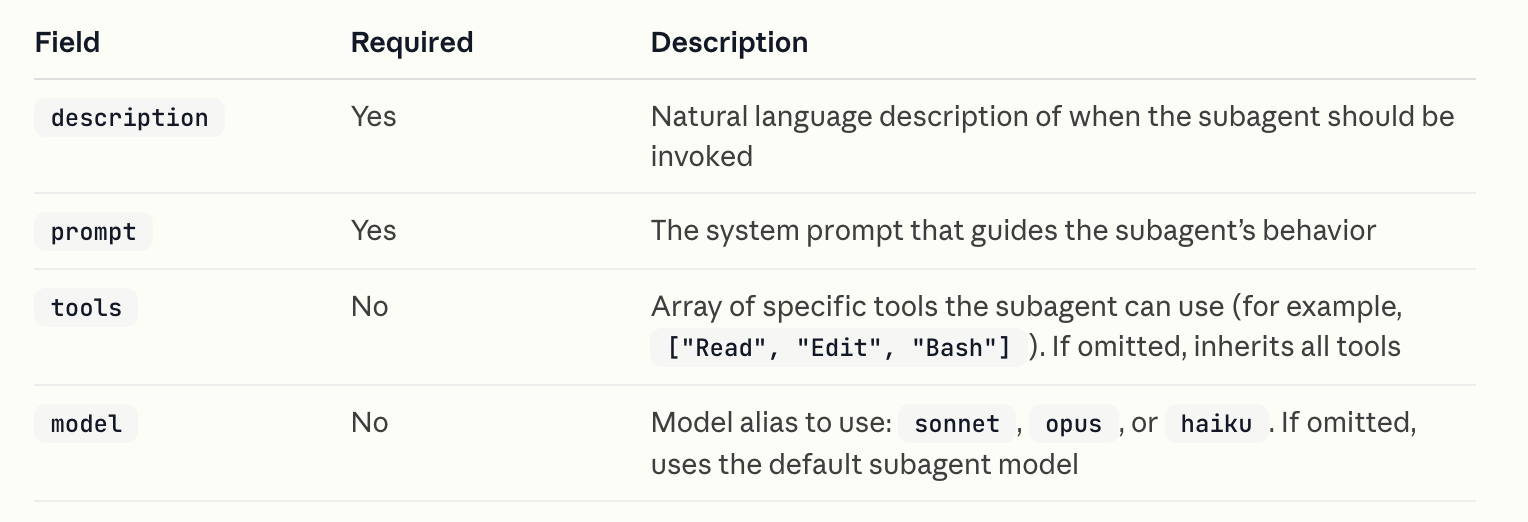
Example:
claude --agents '{
  "code-reviewer": {
    "description": "Expert code reviewer. Use proactively after code changes.",
    "prompt": "You are a senior code reviewer. Focus on code quality, security, and best practices.",
    "tools": ["Read", "Grep", "Glob", "Bash"],
    "model": "sonnet"
  },
  "debugger": {
    "description": "Debugging specialist for errors and test failures.",
    "prompt": "You are an expert debugger. Analyze errors, identify root causes, and provide fixes."
  }
}'
For more details on creating and using subagents, see the subagents documentation.
System prompt flags
Claude Code provides three flags for customizing the system prompt, each serving a different purpose:
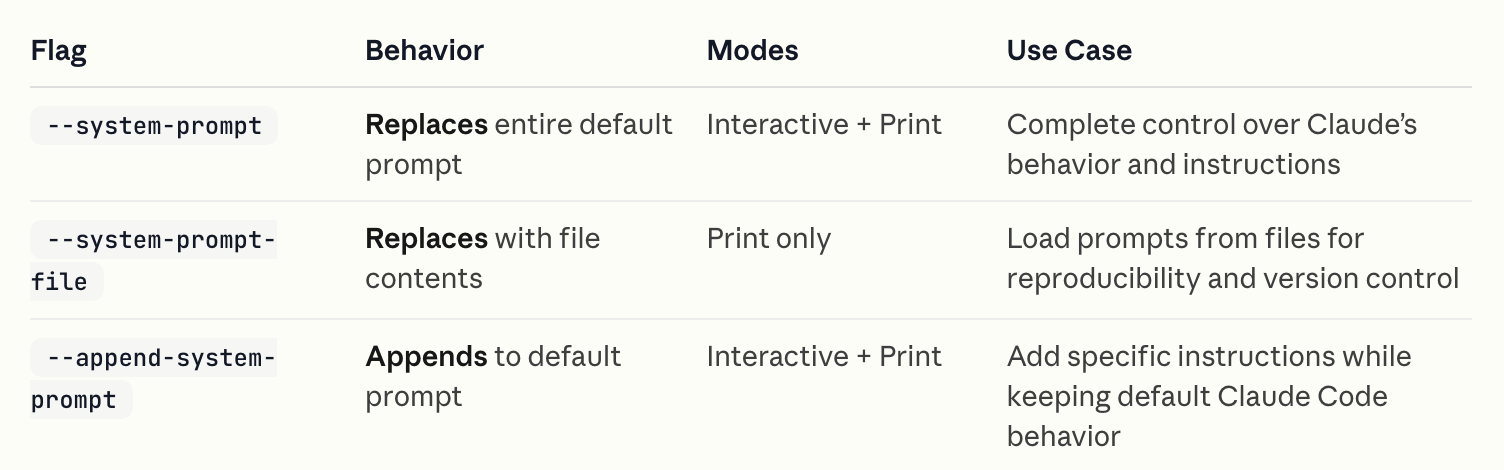
When to use each:
--system-prompt: Use when you need complete control over Claude’s system prompt. This removes all default Claude Code instructions, giving you a blank slate.
claude --system-prompt "You are a Python expert who only writes type-annotated code"--system-prompt-file: Use when you want to load a custom prompt from a file, useful for team consistency or version-controlled prompt templates.
claude -p --system-prompt-file ./prompts/code-review.txt "Review this PR"--append-system-prompt: Use when you want to add specific instructions while keeping Claude Code’s default capabilities intact. This is the safest option for most use cases.
claude --append-system-prompt "Always use TypeScript and include JSDoc comments"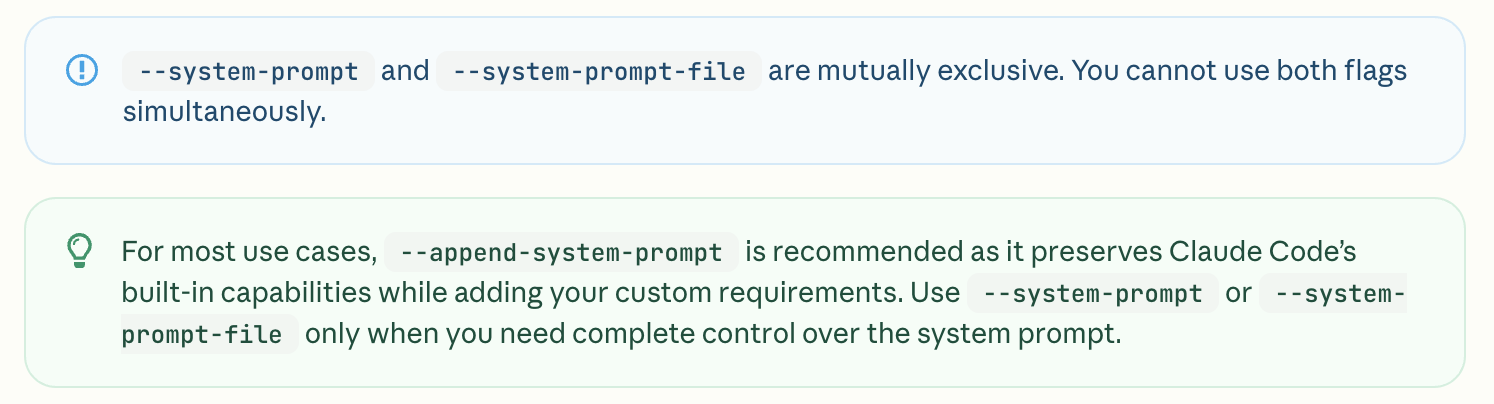
Claude Code MCP
参考:https://code.claude.com/docs/en/mcp
Subagents
参考:https://code.claude.com/docs/en/sub-agents
Create and use specialized AI subagents in Claude Code for task-specific workflows and improved context management.
Custom subagents in Claude Code are specialized AI assistants that can be invoked to handle specific types of tasks. They enable more efficient problem-solving by providing task-specific configurations with customized system prompts, tools and a separate context window.
Agent Skills
参考:https://code.claude.com/docs/en/skills
Create, manage, and share Skills to extend Claude’s capabilities in Claude Code.
最佳实践
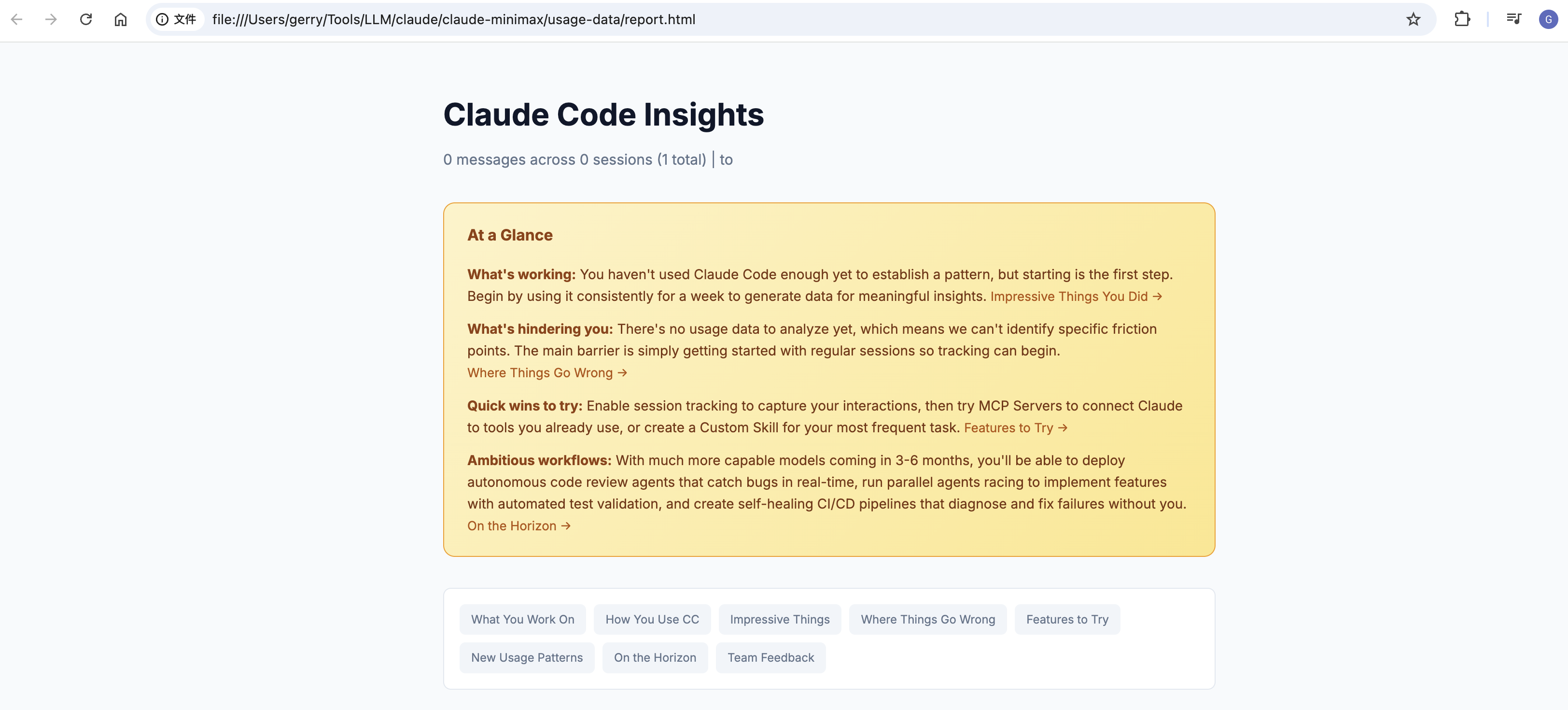
/insights
/insights Generate a report analyzing your Claude Code sessions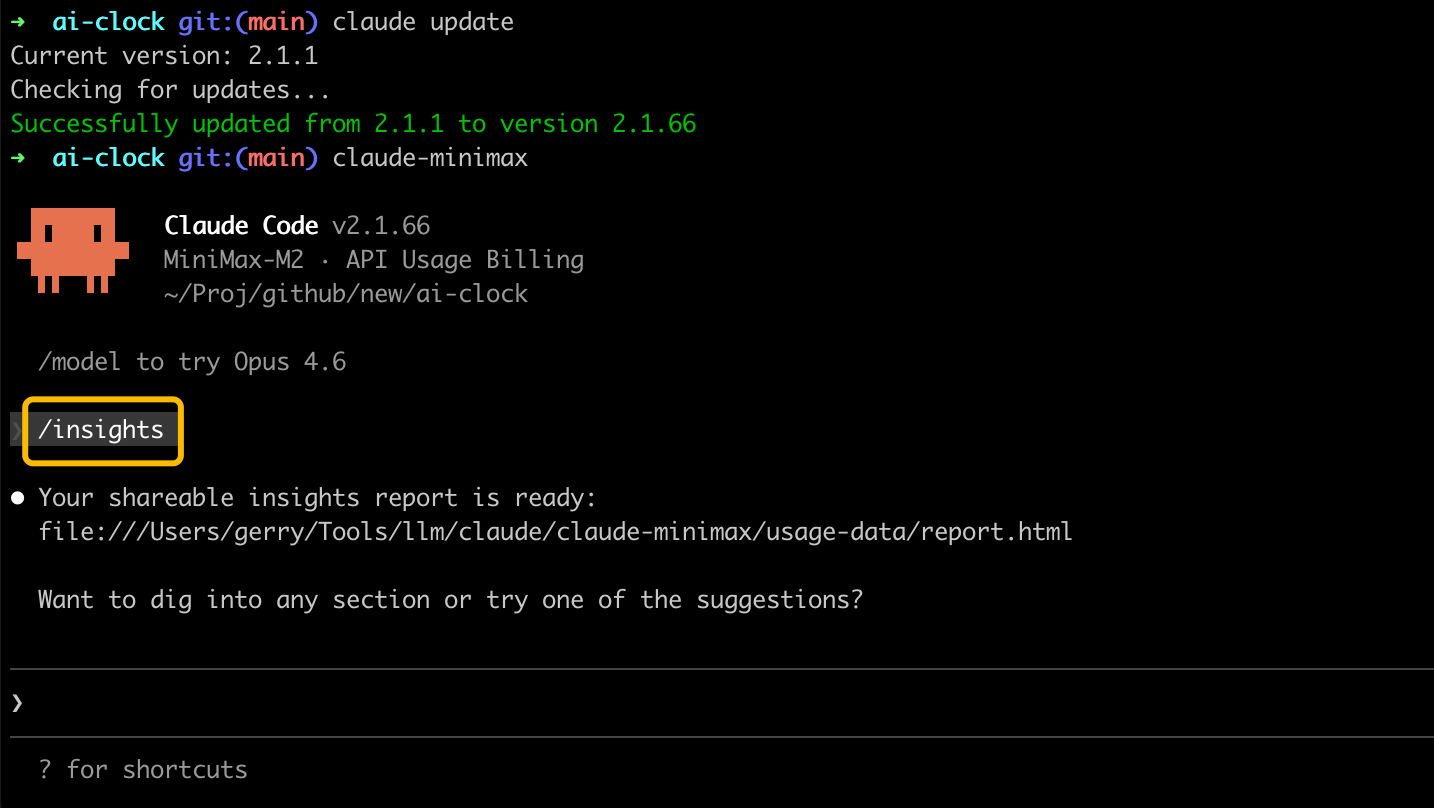
参考:
- https://www.natemeyvis.com/claude-codes-insights/
- https://sonim1.com/en/blog/claude-code-insights/
- https://www.zolkos.com/2026/02/04/deep-dive-how-claude-codes-insights-command-works.html
- https://www.reddit.com/r/claude/comments/1qxatcf/til_claude_insights_actually_gives_you_good/
/loop (Manage scheduled tasks)
Ask Claude in natural language to list or cancel tasks, or reference the underlying tools directly.
示例:
what scheduled tasks do I have?
cancel the deploy check job
Under the hood, Claude uses these tools:
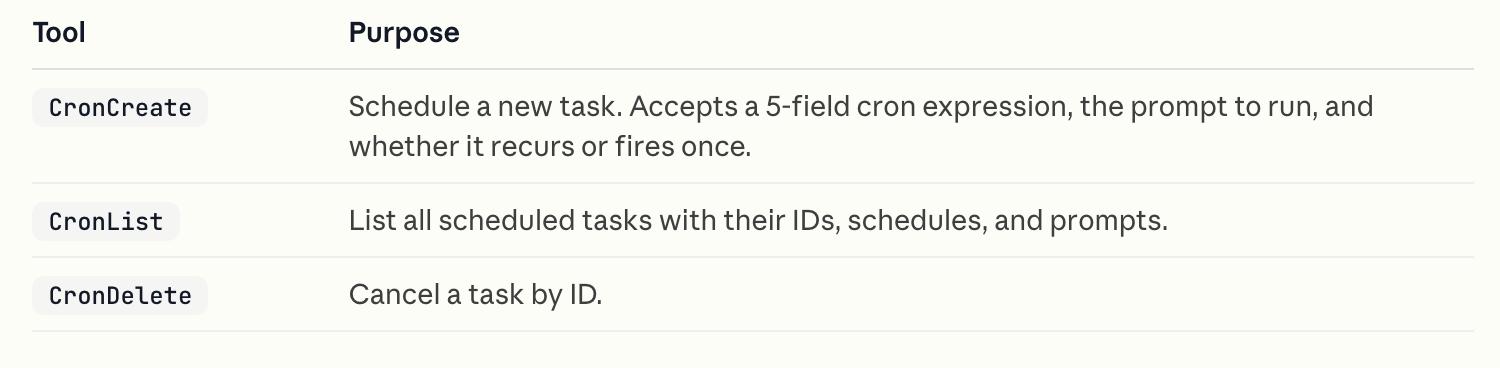
Each scheduled task has an 8-character ID you can pass to CronDelete. A session can hold up to 50 scheduled tasks at once.
参考:
- https://code.claude.com/docs/en/scheduled-tasks
Q&A
国家地区访问限制问题
如果没有清除以下 Anthropic 相关的环境变量,就会提示使用限制的提示:
unset ANTHROPIC_AUTH_TOKEN
unset ANTHROPIC_BASE_URL
Claude Code might not be available in your country. Check supported countries at https://anthropic.com/supported-countries

使用参考
- 国产大模型接入 Claude Code 教程:以 Doubao-Seed-Code 为例
- My Experience With Claude Code After 2 Weeks of Adventures (17 Jul, 2025)
- A Guide to Claude Code 2.0 and getting better at using coding agents (28 Dec, 2025)
Changelog
https://github.com/anthropics/claude-code/blob/main/CHANGELOG.md
Refer
- https://www.anthropic.com/claude-code
- https://github.com/anthropics/claude-code
- https://docs.anthropic.com/en/docs/claude-code/overview
- https://platform.claude.com/cookbooks
- How I Use Claude Code (Feb 10, 2026)